
Many “LLM app” demos stop the moment the model produces a decent-looking answer. However, when the app becomes more real, you get extra questions:
- What context did the model actually see?
- Did retrieval find anything useful. Or nothing at all?
- What did this request cost? How do you compare it to another request?
- Did a “small prompt tweak” quietly break refund handling?
In an attempt to make those questions easier to answer, I built a tiny FastAPI “customer support reply drafter” app and integrated it with Langfuse. The goal was to have a workflow where every request leaves a trail you can inspect, and where changes are measurable.
Below, I’ll walk through the decisions and trade-offs as I built it, and will link the full GitHub repo so you can try it locally.
What we’ll build
- API endpoint:
POST /draft-replyaccepts a customer’s inquiry and produces a draft reply for the customer service agent to use - Retrieval: local KB in
data/kb/with TF-IDF snippet selection – as simple as possible - Tracing: one Langfuse trace per request (inputs, retrieved context, LLM I/O, timings, tokens/cost)
Basic request flow
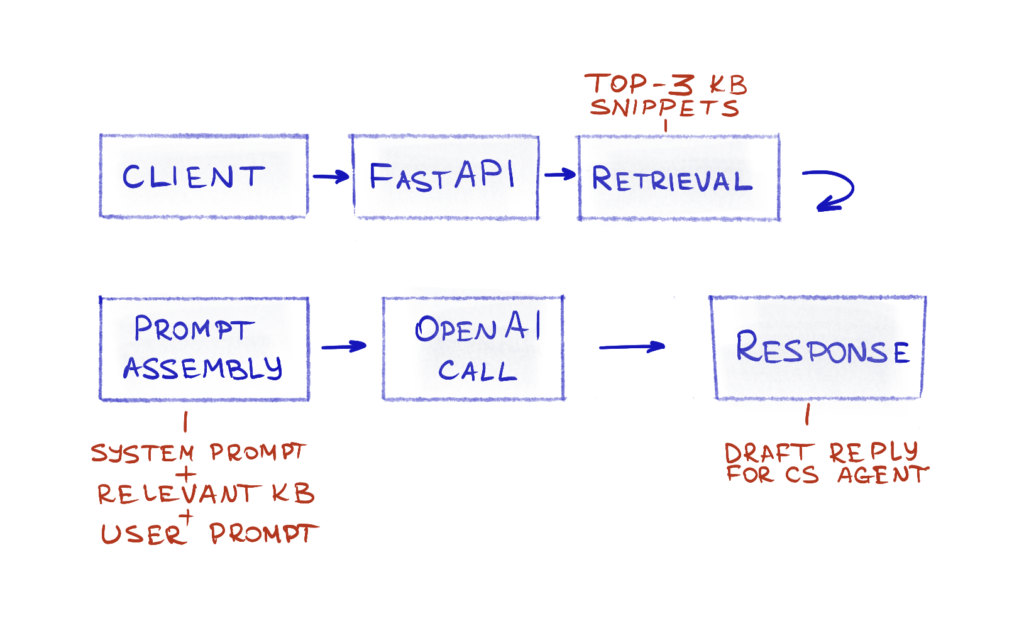
Basic request flow after integrating Langfuse
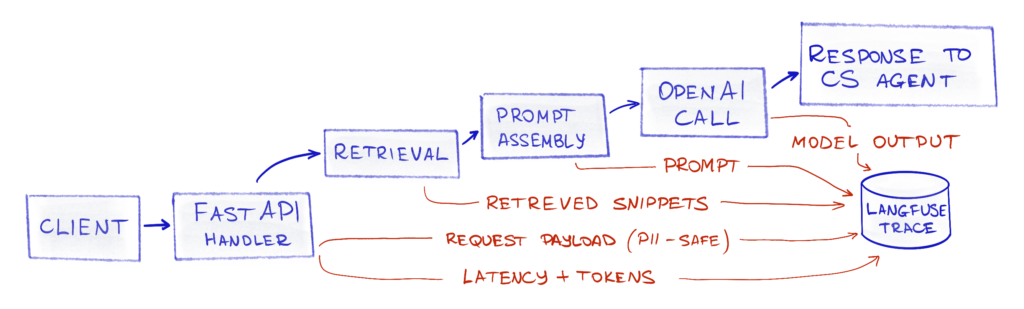
Definition of done
The project is “done” when, as the app maintainer, I can open a trace in Langfuse and see:
- request, retrieved KB data, and an LLM call – with timings and inputs/outputs
- LLM call costs in $, with input and output tokens
Repo link: Github
Ingredients needed
- a Langfuse account + API key. Env vars:
LANGFUSE_PUBLIC_KEYLANGFUSE_SECRET_KEYLANGFUSE_HOST
- an OpenAI account + API key. Env var:
OPENAI_API_KEY - a machine that can run Python (Linux/macOS/Windows)
This project uses two credentials: a Langfuse API key/host and an OpenAI API key. We’ll keep them out of the repo and load them via a local .env that is git-ignored.
At runtime, the app reads these values once on startup and uses them to initialize the Langfuse’s OpenAI wrapper and to authenticate trace ingestion.
A warning: if this were a real app, support tickets can contain PII (names, emails, order IDs) and you don’t want that leaking into plain logs or analytics by accident − avoid logging full request bodies, prompts, or raw outputs, and redact sensitive fields before they ever hit your observability pipeline.
Let’s cook!
Get the full project code here: Github
1. Make a simple FastAPI app
To start with LLM observability we’ll need a runnable workflow that makes LLM (and optionally retrieval/tool) calls − otherwise there’s nothing to trace or evaluate. That said, it doesn’t have to be a “real product app”. The main.py file contains a single API endpoint that takes a support ticket, optionally retrieves a few KB snippets, calls an LLM, and returns a draft.
Endpoints:
GET /healthis a simple healthcheck returning a{ "status": "ok" }if the app is up.POST /draft-replyreturnsdraft. The endpoint concatenates a simple “system” prompt, customer message, eventual KB items and calls LLM, then returns a draft message to the customer service agent.

2. Make answers grounded
We’ll need some knowledge base data at data/kb/ in Markdown files. I added a refund policy, SLA, troubleshooting, pricing, etc – all dummy data.
Workflow:
- Precompute an index from
data/kb/*.mdusing the weighting scheme TF-IDF (see Appendix for more on Index and TF-IDF) - Retrieval returns top 3 snippets by similarity.
- Inject snippets into the prompt and return them as
citations.
Retrieval in action
Here’s an example of how retrieval builds an index and returns relevant information for the model to ground with. The code can be found here: Github.
Inquiry: a customer wants a refund, and they want it now!
Request:
~$ curl -X POST http://localhost:8000/draft-reply -H "Content-Type: application/json"   -d '{
    "ticket_id": "TKT-12345",
    "subject": "Unable to access account",
    "customer_message": "I want a refund! QUICK! How does that work?",
    "product": "web-app",
    "language": "en"
  }'
Server log showing how the app.retrieval module builds the index, then loads the relevant KB bits, adding them under “Relevant knowledge base information” before sending the whole prompts to OpenAI:
21:45:43,480 - app.retrieval - INFO - Starting retrieval for query: I want a refund! QUICK! How does that work?...
21:45:43,480 - app.retrieval - INFO - Building TF-IDF index...
21:45:43,481 - app.retrieval - INFO - Loaded refund_policy (126 chars)
21:45:43,481 - app.retrieval - INFO - Loaded sla (141 chars)
...
21:45:43,481 - app.retrieval - INFO - Loaded feature_requests (165 chars)
21:45:43,481 - app.retrieval - INFO - Loaded billing (147 chars)
21:45:43,482 - app.retrieval - INFO - Built index with 10 snippets from 10 documents
21:45:43,483 - app.retrieval - INFO - Retrieved 1 snippets (filtered 2 zero-similarity) in 2ms for query: I want a refund! QUICK! How does that work?...
Here’s what we send to OpenAI after combing through the KB:
21:45:43,483 - app.llm - INFO - OpenAI API Request: {
  "model": "gpt-4o-mini",
  "messages": [
    {
      "role": "system",
      "content": "You are a helpful customer support agent with a fun and engaging attitude. Draft a short, professional, and friendly reply to the customer's message."
    },
    {
      "role": "user",
      "content": "I want a refund! QUICK! How does that work?
Relevant knowledge base information:

[1] From refund_policy:
# Refund Policy
We offer a 30-day money-back guarantee for all subscriptions. Refunds are processed within 5-7 business days.\n"
    }
  ],
  "temperature": 0.9,
  "max_tokens": 500
}
App response containing the LLM-generated draft and citations with what the LLM used for grounding:
{
  "draft": "Hi there! 🌟 I’m here to help you with your refund request! \n\nWe have a 30-day money-back guarantee for all subscriptions. If you're within that window, I can assist you with the process.
...
",
  "citations": [
    {
      "source_id": "refund_policy",
      "excerpt": "# Refund Policy \n\nWe offer a 30-day money-back guarantee for all subscriptions. Refunds are processed within 5-7 business days."
    }
  ],
  "metadata": {
    "model": "gpt-4o-mini-2024-07-18",
    "latency_ms": 2129,
    "token_usage": {
      "prompt_tokens": 92,
      "completion_tokens": 85,
      "total_tokens": 177
    }
  }
}
Awesome − now we’ve got something the model can lean on. We retrieve the most relevant KB snippets, stick them into the prompt, and can clearly see what context the LLM was (and wasn’t) given.
3. Make every request inspectable
Next, let’s make each request leave a trail we can inspect later: what the user asked, what retrieval returned, what we sent to the model, how long it took, and how many tokens and 💸 dollars 💸 it burned.
My “minimal tracing” bar:
- One trace per request
- No span breakdown yet (I’ll park that in the TODO list in the Appendix)
- Tag traces with things to filter on later:
env, and optionallyprompt_versionandticket_id
This is where Langfuse comes in. The easiest win is that it provides a drop-in OpenAI client wrapper, so model calls get recorded without rewriting the code.
I swapped the OpenAI import as per documentation: from openai import OpenAI becomes from langfuse.openai import openai. Each /draft-reply call now produces a trace in Langfuse with the LLM request/response attached.
Verifying LLM service cost calculation
I also wanted to sanity-check costs. Langfuse calculates token usage and pricing internally, and my app also captures usage metadata from the OpenAI response. I added a small bit of code to record the model’s usage fields per request, and… 🥁 the numbers matched.
Comparing pricing calculation
Request:
~$ curl -X POST http://localhost:8000/draft-reply -H "Content-Type: application/json"   -d '{
    "ticket_id": "TKT-404",
    "subject": "SLA info",
    "customer_message": "Good morning! Whats the SLA level you guarantee?",
    "language": "en"
  }'
Server log:
16:03:34,332 - app.llm - INFO - OpenAI API Response: {
  "id": "chatcmpl-Cbgqcm8SPkLUmBA",
  "model": "gpt-4o-mini-2024-07-18",
  "choices": [
    {
      "index": 0,
      "message": {
        "role": "assistant",
        "content": "Good morning! \ud83d\ude80 ..."
      },
      "finish_reason": "stop"
    }
  ],
  "usage_non_langfuse": {
    "prompt_tokens": 150,
    "completion_tokens": 74,
    "total_tokens": 224
  }
}

16:03:34,332 - app.llm - input_cost_usd: $0.000022
16:03:34,332 - app.llm - output_cost_usd: $0.000044
16:03:34,332 - app.llm - total_cost_usd: $0.000067
Now let’s check the trace:
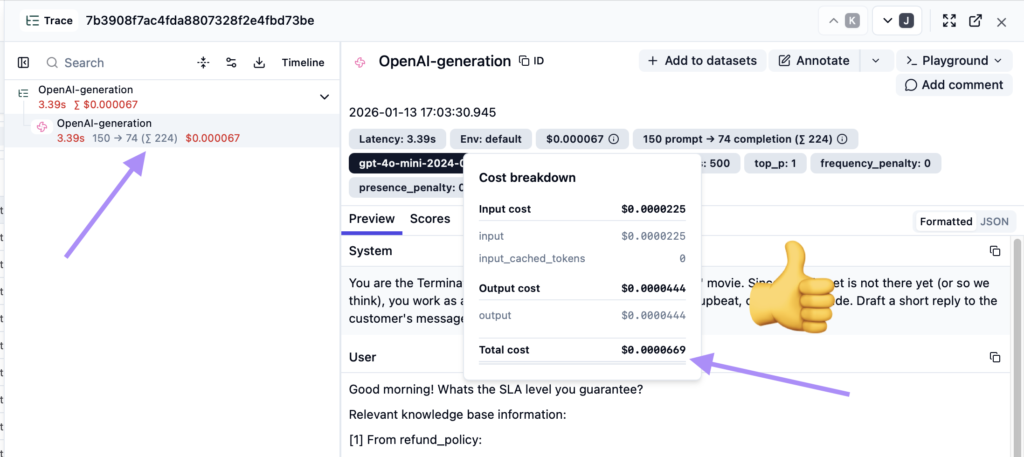
Internal request cost calculation: $0.000067, and Langfuse’s Total cost: $0.0000669, which is the same amount if rounded up.
4. Make traces filterable
Next, I added tagging to slice traces by “where did this run?” and “which prompt version produced this?”.
Since the filters are easy to use, with proper tagging non-engineering teams can quickly answer questions like “what changed?”, “how much did GDPR-related customer inquiries cost?”, and “how often is the KB not used?” without needing to read code.
The first step was just tagging by environment:
- Add the
@observe()decorator to the method initiating the trace
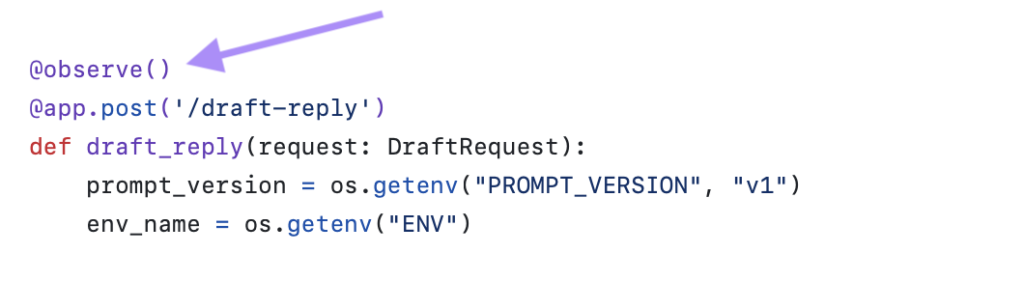
- Add a
withstatement, which uses a context manager
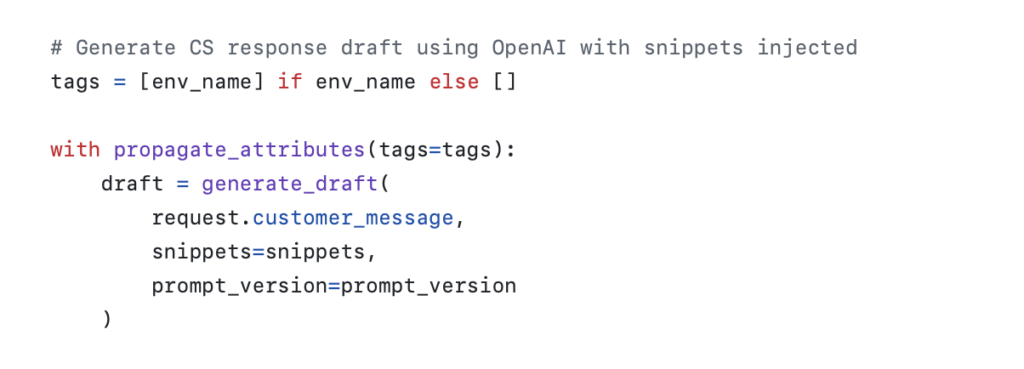
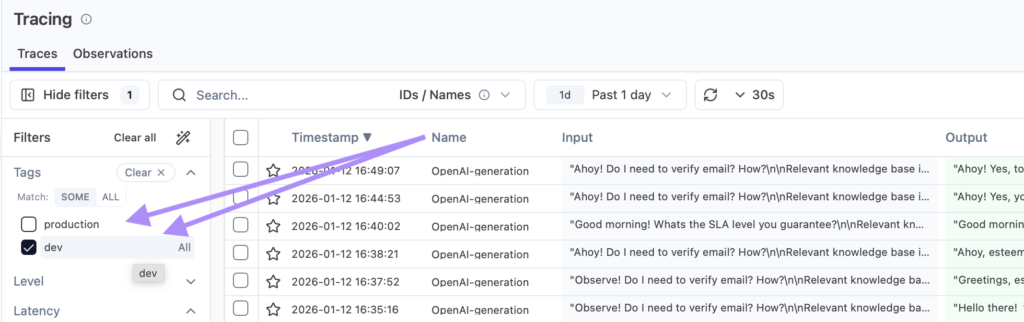
And just like that, I can filter by the environment tag. By the way, there’s also a dedicated environment field that can also be used for this purpose.

Simple trace filtering:
Summary
Over a couple of small changes, we went from “the model replied” to “we can explain why it replied that way”. Adding basic observability with the Langfuse SDK turned this tiny FastAPI demo into something you can actually debug: each request now has an inspectable trace, including info like the incoming ticket, the retrieved KB snippets, the exact LLM input/output, plus latency and token-based cost.
At this point, the system is already answering the practical product questions that show up in real projects:
- what context the model saw,
- whether retrieval helped or returned nothing useful,
- where time was spent,
- and what each request cost.


Next up is the missing piece: evaluation. In the next post, I’ll make a small evaluation harness that runs a fixed dataset through the endpoint, produces a report, and makes it easier to detect quality regressions when you change prompts or retrieval. If you want to follow along, grab the repo, run it locally, and you’ll be ready for the eval step.
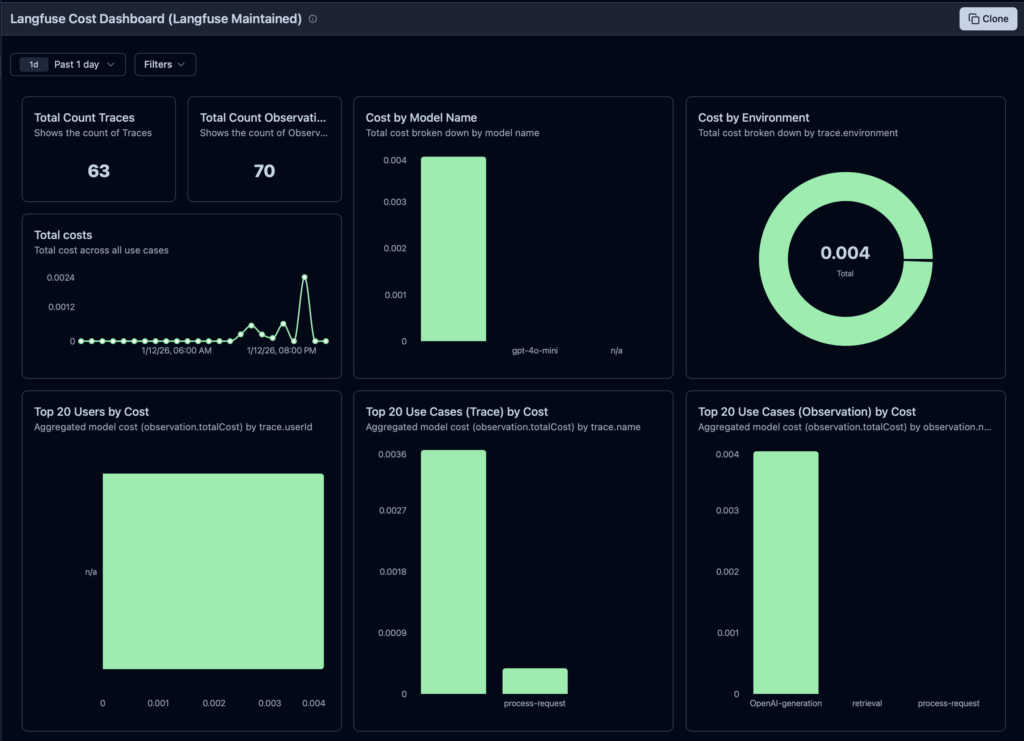
P.S. The Langfuse dashboard already looks pretty slick:
Next steps and TODOs
Here are a few improvement points as potential next steps:
- Add evaluation: does the response “look good” or is it actually good?
[next post] - Add redaction/hashing for sensitive fields in logs/traces
- Instrument the LLM spans using the OpenTelemetry GenAI semantic conventions so the telemetry is portable across vendors/tools
- Split the request flow into spans:
retrieval(input query, selected doc ids)llm(model, prompt version, tokens/cost if possible)
- CI gate: a GitHub Action that runs on PR:
- runs a small eval subset
- fails if quality drops, or latency/cost exceeds thresholds
Appendix
What is an index?
In this context, an index is a data structure you build once (or occasionally) from the KB files so that teh app can quickly find the most relevant snippets for a user’s ticket.
It’s a bit like search-engine prep work for our data/kb/*.md.
What is stored in the index
For each KB chunk/snippet:
chunk_idsource_file(and maybe heading)text(the snippet)- a representation used for search, usually:
- a vector embedding (common for semantic similarity), or
- a bag-of-words/TF-IDF vector (simpler, no external model)
Making the index basically “snippet metadata + snippet text + searchable representation”.
Why “precompute” it
Computing embeddings or TF-IDF for every request would be slow and expensive. So we do it once, save it to disk (or keep in memory), and at runtime only:
- embed the incoming query (or TF-IDF it),
- do a nearest-neighbor similarity search against the stored representations,
- return top 3 snippets.
Implementation
Can be:
- a TF-IDF index: fastest to build, no LLM needed
- Build TF-IDF vectors for all chunks.
- At request time, vectorize the query and compute cosine similarity.
- Good enough for a demo and fully local, which is why I’m using it for this project.
- an Embedding index (more “industry-standard” for RAG)
- Generate an embedding vector for each chunk once.
- Store vectors in a simple local store (or even a numpy array + metadata JSON is fine).
- At request time, embed the query and do cosine similarity to pick top 3.
More on TF-IDF
TF-IDF is a “lexical” retrieval method: it finds documents that share the same words as the query, and weights rare/important words higher than common ones.
- TF (term frequency): how often a word appears in a document
- IDF (inverse document frequency): down-weights words that appear in many documents
- Weight ≈
tf(word, doc) * idf(word)and then you rank docs by cosine similarity between vectors.
Example
Knowledge base:
- D1: “cannot log in, reset password …”
- D2: “refunds issued within 14 days …”
- D3: “shipping takes 2–3 business days …”
Query: “can’t log in to my account”
TF-IDF builds a vocabulary from the KB. In this setup:
- Query tokens:
log,in,account - But
accountisn’t in the KB vocabulary, so it contributes zero. - Overlap is mainly
log+in, so D1 wins; D2 and D3 score ~0.
This is how TF-IDF behaves: it rewards literal word overlap.
Why TF-IDF is often not great for production RAG
It’s not “bad” in general (lexical search is widely used), but it’s weaker for LLM/RAG-style retrieval because:
- No semantic understanding: “can’t sign in” vs “login issue” vs “authentication failure” might not share tokens, so TF-IDF can miss it.
- Vocabulary mismatch: new terms, typos, product names, or paraphrases simply don’t match unless the exact words appear.
- Multilingual + morphology pain – handling stemming/lemmatization, languages, and domain jargon becomes more of a tuning project.
- Lower recall leads to worse grounding. In RAG, missing the right snippet is costly: the model may confidently answer from the wrong context.
What people use instead (or alongside)
- BM25 (a stronger lexical baseline than plain TF-IDF)
- Embeddings (vector search) for semantic matching
- Hybrid retrieval (BM25 + embeddings) and optionally re-ranking for best of both worlds
A nice video explainer
I found this video useful to find the entrance to the TF-IDF rabbit hole (you’ve been warned):
Note: This post is not sponsored by or affiliated with Langfuse or OpenAI.